
Open Settings → Trading to review the application-wide order defaults. This page covers the global controls; the Trading Dashboard guides explain account connections, strategy deployment and the complete order-setting hierarchy.
Start with the global defaults
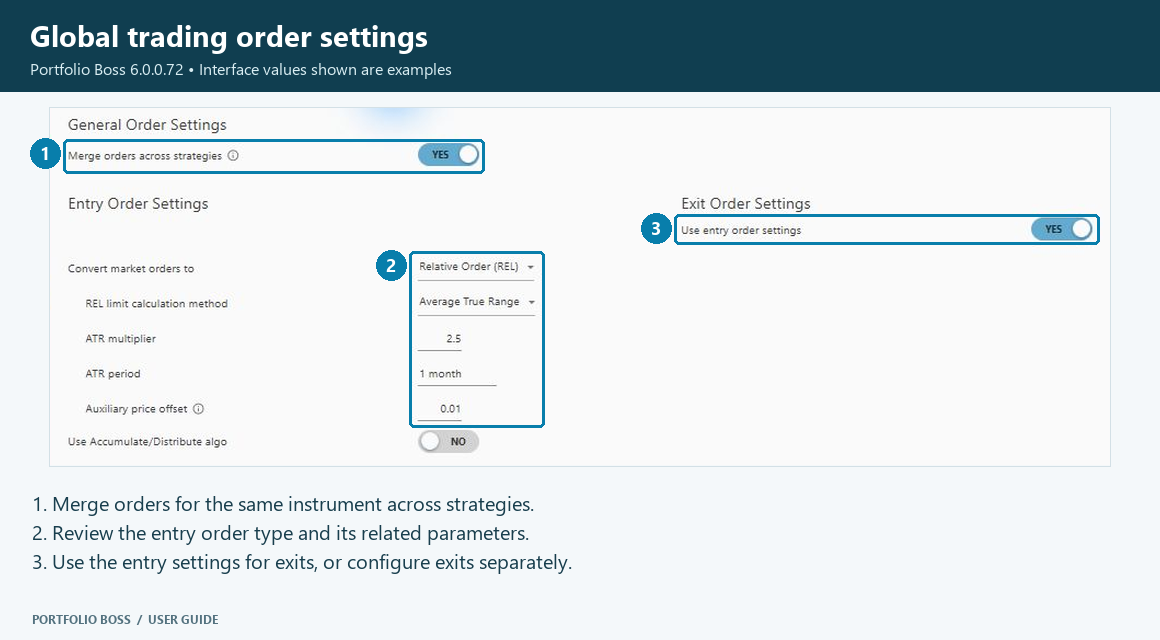
| Control | What to check |
|---|---|
| Merge orders across strategies | Controls whether orders for the same instrument across strategies can be combined. Review this together with account and strategy settings when tracing how a broker order was produced. |
| Entry Orders | Defines the global handling of entry orders, including the market-order conversion and any controls exposed by the selected order mode. |
| Exit Orders | Can use the entry-order settings. Check Use entry order settings before assuming exits have a separate configuration. |
Read the entry-order controls
The Convert market orders selector includes Relative Order (REL) and Market Order (MKT/OPG). The selected mode determines which related controls appear.
For a relative-order configuration, the screen can show limit-price calculation controls such as an ATR period, multiplier and price offset. The Use Accumulate/Distribute algo control is also shown. These values affect order execution behavior; copy settings only when you understand how they fit the intended account and strategy workflow.
For definitions, examples and how global, account and strategy settings work together, read Configure Trading Order Settings.
Continue in the Trading Dashboard
- Connect an account
- Add a strategy and inspect its positions
- Manage funding and rebalancing
- Review orders and reconcile actual broker positions
The current Trading tab replaces the older Interactive Brokers tab in Settings. Connect and manage brokerage accounts from the dashboard.


Responses